

If you are looking for how to have a free website, the possibilities are not lacking. You can start with a visual editor, use a free plan with subdomain or post handwritten files on a static hosting service.
The point is to understand what “gratis” really means. A platform may not ask for money for publication, but let you design, texts, images, domain configuration, updates and problem solving. In other cases the initial cost is zero, while some functions necessary for an activity become available only with a paid plan.
This guide compares five real roads. It is not necessary to prove that they are always wrong: for a personal project, a test or a temporary page can be sufficient. You need to understand what compromise you’re accepting and when you do it stops being convenient.
In short: you can put a site online without paying a platform, but rarely get professional domain, design freedom, SEO, maintenance and service together. Before choosing, consider the value of your time as well.
First distinction: what should be free?
The phrase “free internet site” can indicate at least five different things:
- Development:* no compensation for those who design and build the site.
- Platform: no subscription to use editor or management system.
- Hosting:* no cost to store online pages and images.
- Domain:* no cost for an address like
nomeazienda.it. - Management:* no cost for updates, assistance and problem correction.
A solution can cover one or two points without covering the others. For example, hosting can be free but require technical skills; editor can be free but publish on a subdomain; development can cost nothing because you do it, but engage for many days.
For this it is useful to compare the total cost and not only the first invoice. The study onhosting, maintenance and serviceexplains what activities continue after online mass.
The 5 ways to create a website for free
| Solution | Difficulty | Free address | Control | Suitable especially for |
|---|---|---|---|---|
| Google Sites | Low | Subdomain Google | Limited | Essential information |
| WordPress. Community | Middle-low | Name. wordpress. Community | Limited to the free plan | Blogs or initial editorial project |
| Wix | Middle-low | Underground Wix | Good on appearance, with limits | Visual sketch or small project |
| Canva Websites | Low | Subdomain Canvas | Limited | Landing or simple presentation |
| GitHub Pages | High | user. github.io | High on code | Static site managed by the developer |
Service conditions can change. Before investing time, always check the documentation and plan available when you start.
1. Google Sites: simple, but not customizable
Google Sitesallows you to choose a model, insert texts and images and publish without writing code. It is probably one of the fastest roads to create an internal page, a collection of materials or an essential presentation.
The ease is also its limit. The visual structure remains linked to the available blocks and does not offer the same control of a site designed around an identity, a commercial path or specific technical needs. Prepare different service pages, articulated hierarchies and custom interactions can become uncomfortable.
It may make sense if:* you must share information, documents or references with an already acquired audience.
It is less suitable if:* the site must distinguish an activity, generate requests and become the center of online presence.
2. WordPress. free com: a basis for publishing content
Free planWordPress. Communityincludes hosting and uses a nomesito.wordpress.com type address; the custom domain is not included. The environment is suitable for publishing articles and offers ready themes to start with.
It should not be confused with a WordPress project installed on a hosting chosen by you. In the free plan, customization, functions and extension possibilities depend on the constraints of the service. If you want to change design, commercial tools or integrations in depth, you may need to change your plan or rethink the structure.
Also choose theme, menu, pages, categories and settings takes time. The comparison betweencustom site and WordPresshelps to distinguish the tool from design work.
It may make sense if:* you want to start a personal blog and accept the subdomain.
It is less suitable if:** you want a custom built business presence without depending on the limits of the free plan.
3. Free Wix: visual editor with Wix address
Wix allows you to build the site through a visual editor. Theofficial guide to the free websitespecifies that a custom domain requires an upgrade; the free site uses an address in the siteprefix.wixsite.com/siteaddress format.
The editor reduces the need to write code, but does not eliminate decisions. You have to choose structure, style, texts, images, mobile version, modules and actions to propose. Adding many functions without an initial project can produce a heavy or unconsistent page.
There is also a migration theme: when content and layouts were built into a proprietary platform, changing system is not always equivalent to exporting some files and continuing elsewhere.
It may make sense if:** you want to quickly create a visual draft and verify an idea.
It is less suitable if:* you want domain control, a very precise identity or a simple base to transfer in the future.
4. Canva Websites: immediate for a presentation
Canva Websitesallows free users to customize models and publish them on a my.canva.site domain. It is a natural extension for those who already prepare presentations and graphical content with Canva.
The speed makes it interesting for an event page, a compact portfolio or a temporary presentation. A company site, however, must often manage more services, autonomous pages, up-to-date content, navigation, measurement and contact paths. In these cases an approach born above all from visual composition can become restrictive.
The risk is to confuse a pleasant page with a structure capable of answering the real questions of customers. Acustom website for a businessinstead starts from objectives, public and content.
It can make sense if:* you need a simple, visual and fast page to share.
It is less suitable if:* expect a progressive growth of pages, content and functions.
5. GitHub Pages: free hosting, skills not included
GitHub Pagesis a static hosting service that publishes HTML, CSS and JavaScript files from a repository. GitHub Free is available for public repositories and offers much more control over the code than visual editors.
The hosting service can be free, but someone has to build the site. You need to know at least HTML structure, styles, responsive design, image optimization, Git, repository, publishing configuration and error management. Additional services are needed for a server-processing module or other dynamic functions.
It is a good technology for those who develop. For the owner of an activity that wants to independently update services, reviews or projects can instead transform any changes in a technical intervention.
It may make sense if:* you can program or already have a ready static site.
It is less suitable if:* you want a simple editor, assistance or updates without intervening on the code.
The hidden costs of a free site
The easiest shopping to forget is time. Before the publication, however, we must:
- define objective and public;
- organize the pages;
- write comprehensible texts;
- choose and optimize images;
- adapt the site to smartphones;
- set titles, descriptions and links;
- prepare privacy, cookies and measuring instruments consistent with what is used;
- try modules, buttons and contacts;
- update the site when changing services or information.
If you spend thirty hours and allocate at your time a value of 30 euros per hour, the internal cost is already 900 euros, even without an invoice. It does not mean that you must necessarily delegate: it means that the correct comparison is between equivalent results.
Domain also deserves attention. A free subdomain can be enough for a test, but a short and busy address is easier to communicate. Registration, renewal and DNS configuration can remain separated from the free plan.
Finally there is maintenance. When a link does not work, a page is displayed badly or you want to add a service, you need to know where to intervene. A free, supportless solution shifts responsibility over you.
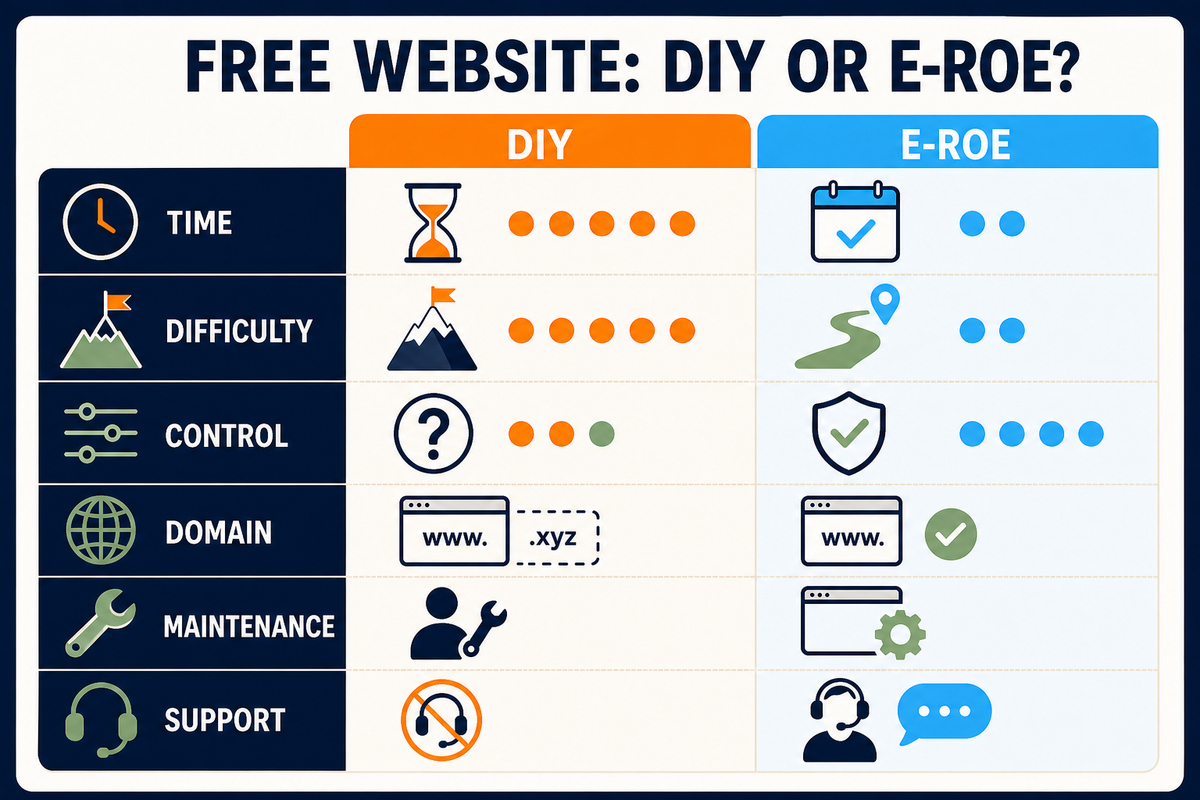
The alternative E-ROE: free development, declared service
The E-ROE offer addresses the problem differently. It does not give you an editor and does not ask you to build the site yourself: ** resets the 1,500 Euros of initial development*** and prepares a proposal tailored to your business.
See the website first. Then decide whether to publish it. If it does not convince you, you are not required to purchase the publication. If you choose to put it online, you activate E-ROE Always Updated Website for 480 euros per year, with annual payment in advance and a final price.
The 480 euros are not a hidden cost of development: they are the annual service that allows you to publish and maintain the project. It is an important difference, because it allows you to compare the offer with alternatives without calling “gratis” what is not.
The request is evaluated before the start, even to verify that the project is compatible with the service and with the available capacity. You can read essential conditions andrequest the free site E-ROE.
What solution to choose?
Choose a free DIY tool if the project is temporary, the subdomain is not a problem and you have time to learn. Google Sites and Canvas reduce the difficulty; WordPress.com and Wix offer more possibilities but introduce further decisions; GitHub Pages is powerful when you already have technical skills.
Consider a guided route if the site has to represent an activity, be found, collect requests and stay up to date without turning into the project technician.
Before deciding you can also comparehow much it normally costs a websiteand which elements distinguish ahomepage that generate contacts. The initial price is only one of the criteria: they count clarity, control and work necessary to get online.
Frequently asked questions
Is it really possible to create a website for free?
Yes, some platforms allow you to design and publish a simple site for free. However, it is usually necessary to accept a subdomain, limited functions, possible branding of the platform and autonomous management of texts, structure, SEO and updates.
Can I use my personal domain for free?
The personal domain normally has a registration and renewal fee. Some free services also require a paid plan to connect it, while others, such as GitHub Pages, allow the connection but leave your purchase and DNS configuration at your expense.
What is the easiest way to create a free site?
For an essential information page, visual tools such as Google Sites or Canvas are generally more immediate. Simplicity, however, involves less freedom on structure, functions and visual identity.
Can a free site place on Google?
It can be indexed, but visibility does not depend on just being online. We need useful content, understandable structure, adequate performance, trusted signals and the technical ability to manage titles, metadata, links and pages.
How does the E-ROE free site work?
E-ROE resets the initial 1,500 euro development and prepares the custom site. You see it before deciding: if you choose to publish it, activate the service at 480 euros per year, with an early annual payment and final price. The request is subject to evaluation.
For a business offer, use the seven checks for a free website in Italy to clarify the domain, publication, renewals and account access.