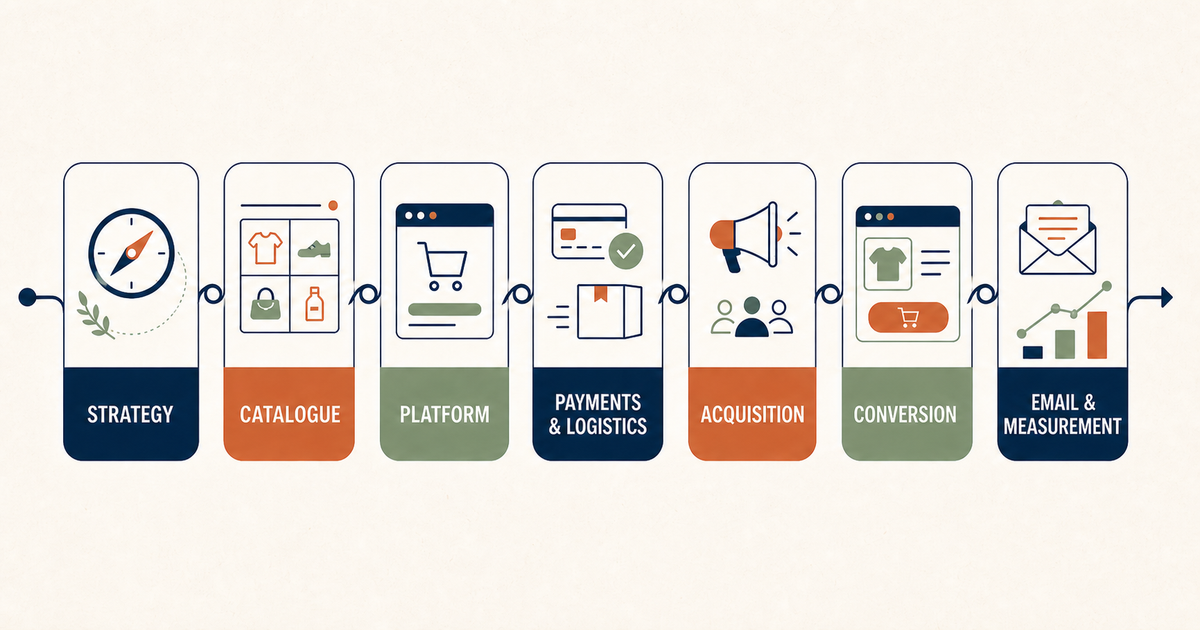

Creating an ecommerce from scratch means building a sales system, not only choosing a graphic theme and loading some products. Before a complete person an order must work together offer, catalog, payments, shipments, trust, assistance and acquisition of traffic.
Many projects start from the platform. It is understandable, because it is the most visible part, but it is almost never the first decision to make. If they are not clear public, margins, logistics and internal process, the shop risks being technically online but commercially fragile.
This guide organizes work in the most useful order.
1. Define what you really have to sell the shop
Before the catalogue you need an understanding proposal. A person who comes for the first time must understand what you sell, for whom it is thought and why should choose this solution.
Clear at least:
- products or categories from which to start;
- main customer;
- problem, desire or opportunity of purchase;
- difference with alternatives;
- price range;
- trust reasons available;
- goal of the first six months.
You do not need to publish the whole assortment on the first day. Often it is advisable to start from categories that have more solid margins, availability and arguments.
2. Check margins and sustainability
The turnover does not coincide with the money remaining. Before investing in development calculates the margin after product cost, packing, shipping, payment fees, returns, promotions and customer acquisition.
A sale may sound positive and become negative when all costs are added. Control must be done by category and, when differences are important, for individual product.
Define also:
- average value of the desired order;
- free shipping threshold;
- minimum acceptable margin;
- maximum cost to acquire a customer;
- probability and value of repurchase.
These numbers will guide campaigns, bundles, discounts and catalog priorities.
3. Choose the platform based on the process
Shopify, WooCommerce and other platforms can all work. The useful question is not what is the absolute best, but which reduces friction in the specific project.
Currency:
- number of products and variants;
- countries, languages and currencies;
- payment methods;
- tax rules;
- warehouses and availability;
- connections with management, couriers or marketplace;
- frequency of updates;
- skills of those who will manage the shop;
- total cost over the next three years.
The cheapest platform at first is not always the one that costs less in time. Plugins, maintenance, customized development and manual work can change comparison.
4. Design catalog structure
A catalog should help you find, compare and choose. Categories too generic force the user to scroll; categories too fragmented create blank pages and difficult to maintain.
For each category ask yourself:
- which need to combine the products;
- which filters really help the choice;
- what information you need before opening a tab;
- which searches can intercept the page;
- which products deserve greater visibility.
Define URLs, categories and attributes before import. Fixing a structure after loading hundreds of products is slower and can create redirects, duplications and SEO issues.
5. Prepare useful product cards
The product card must replace a part of the conversation that would happen in the store. Title and photographs are not enough.
A complete card includes:
- main benefit;
- characteristics that influence the choice;
- measures, materials or compatibility;
- available variants;
- delivery times and costs;
- return policies;
- instructions or maintenance;
- relevant reviews or proofs;
- answers to frequent doubts;
- sensible complementary products.
Texts must be specific. Phrases like “high quality” or “one product” do not help if they are not explained with verifiable elements.
6. Organize payments, shipments and returns
Before launch, complete test orders. Check payment authorization, email, order preparation, label, tracking, delivery, cancellation and refund.
Check in particular:
- alternative cards and methods;
- incomplete addresses;
- shipments in different areas;
- free thresholds;
- products not available;
- orders with more rates or rules;
- return procedure;
- communication to the customer.
A clear procedure reduces assistance and negative reviews.
7. Build confidence before checkout
Who does not know the brand seeks confirmation. We need real contacts, company information, readable policies, declared times and a website consistent also by smartphones.
Do not hide shipments or returns until the last step. Surprise at checkout is one of the most common reasons why a person stops buying.
Trust grows when promise, photographs, texts, assistance and conditions tell the same thing.
8. Prepare plan to bring traffic
Publish the shop does not automatically create question. Before the launch, you will determine how the first visitors arrive and what message they will see.
The plan can combine:
- search or social campaigns;
- SEO content;
- already existing public;
- email and waiting list;
- creator and partnership;
- customers of shops or previous channels;
- launch to progressive segments.
Each channel must lead to a consistent page. Sending all traffic to the homepage makes it more difficult to understand what works.
9. Configure measurement and email
Before launch check product display events, added to cart, checkout and purchase. Check that currency, value and identification are not duplicated.
Prepare at least:
- transational confirmations;
- welcome for new members;
- cart recovery and checkout;
- post-purchase communications;
- request review when appropriate;
- customer and inactive segments.
Automations do not replace a weak offer, but prevent losing all people who do not buy at the first visit.
10. Launches controlledly
Before opening to the whole audience invites a limited group. See questions, errors and points where people stop.
The final checklist includes:
- real order from mobile and desktop;
- email received correctly;
- speed of the main pages;
- search and filters;
- availability of products;
- privacy, cookies and conditions;
- contacts and assistance;
- tracking of conversions;
- backup and administrative access;
- plan of the first four weeks.
The next step
If you are considering a new shop, start from a realistic catalog map, margins and processes. The page dedicated tomanagement and ecommerce creationexplains how E-ROE connects shops, campaigns, emails and content. If the shop is already online, you can start with the free check available inecommerce resources.